
Old links to index-site.com need to be updated to macmaps.com.
Effectively immediately, the dialup access numbers provided later in this page are only for example purposes only, for an internet provider that previously offered dialup, Smart.net. Settings offered here may pertain to other dialup providers. Point them to this page for them to be able to offer you comparable settings for help.
This page last modified Dec 12, 2021 * this page is considered to be in archive state. Hyperarchive and its software are no longer available. Old Apps Mac and Low End Mac may be a better source for some of these older software titles.
FreePPP (608k - 5 minute download at 28.8kbps) works with Smart.net assuming you have Mac OS 7.5.3 or later with OpenTransport 1.1 or later. If you do not have a PowerMacintosh (models 1000 and up, G3 series, and iMacs),
please visit the Setting up MacPPP page.
If you have a Remote Access or you have a PPP control panel already
present in your Control Panels folder in your Apple menu, please visit
the OpenTransport setup page
The following shows you how to setup Smart.net Using FreePPP.
Upon finishing the installation of FreePPP you should find the FreePPP setup program. 
Make sure that Allow applications to open connection is selected
Make sure that your disconnect if idle is set as high as you like by clicking on the popup menu where it says
10 minutes and changing to the time desired
Make sure that Check line state when connected is checked
Make sure that Show alerts during connect and disconnect is on
It is optional, but you can check open FreePPP Setup application on connect, although you may run into
difficulty if your built-in memory isn't sufficient. One nice feature of FreePPP is that you can set it up to open your
web browser or e-mailer upon connection through the final item "Open Application on connect..." Next Open TCP/IP by clicking on the button at the bottom of the FreePPP setup window

You should get a window that says TCP/IP. If implicit search path, starting domain name is not on the right hand side of the TCP/IP window as shown here, then go to
go into the edit menu

Select User Mode...

And select advanced and click OK
Now make sure the Connect via says FreePPP.
Make sure Configure is set for Using PPP Server.
Make sure the name server addr. is 207.176.80.80 followed by a return key and 207.176.80.88 on the second line.
Implicit Search Path: Starting Domain Name should be dns1.smart.net. Now click on Options...

Make sure TCP/IP is active, and Load only when needed.
Click on OK, and close TCP/IP from the upper left hand corner of its window.
Now back to the FreePPP Setup program
Click on Accounts. You can create as many accounts through the Edit and New command as you like.
Edit allows you to edit an existing account's setting, New allows you to create a new account, and duplicate allows
you to start with the same settings as a previously set up account. Each account is essentially a different dialup number.
 Click on Edit, new or Duplicate and the following window should come up

You can give your account name anything you like, but it is good to include the number of the account
in the name so you won't forget which one you are dialing.
Smart.net uses two dialup protocols, one requiring scripts, one that can be accessed directly. They are separated by dialup number. A table describing each method is given below:
| Below are non-PAP connections <img data-cke-saved-src="images/FreePPP.2.script.GIF" src="images/FreePPP.2.script.GIF" "="" align="BOTTOM" border="0"> Select from the menu to the right of Connect: "Using Connection Script" |
below are PAP connections:  Make sure Connect Directly is selected, and type in your username and password as you worked out with Smart.net. |
| Click on Edit connection script 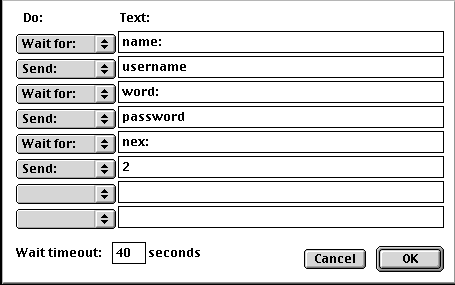 Under the Text type the following words in, one per line: name: your Smart.net Username word: your Smart.net Password nex: 2 The Do side of the window should read: Wait for: Send: Wait for: Send: Wait for: Send: and two blank do menuitems selected. and click on OK. |
Now click on your dialup tab, and plug in the area code of the dialup number in the right field, and 7 digit phone number in the Phone number field. For this you can only use 301-323-1008 301-361-0235 410-369-0101 410-369-0585 703-386-2122 Check the Dial area code button  Click on OK |
| Now click on your dialup tab, and plug in the area code of the dialup number in the right field, and 7 digit phone number in the Phone number field. For this you can only use 301-470-1700 or 410-792-7997. Check the "Dial area code" button. Click on OK |
Click on Options tab And make sure Configure OT TCP/IP for this account is selected and do not edit anything else. If you find the Domain name has a value, or the primary and secondary DNS are not 0.0.0.0, empty the former, and fill in the two others with 0.0.0.0. IP Address should be Assigned by PPP server. Click on OK. |
| Click on Options tab And make sure Configure OT TCP/IP for this account is selected and do not edit anything else. If you find the Domain name has a value, or the primary and secondary DNS are not 0.0.0.0, empty the former, and fill in the two others with 0.0.0.0. IP Address should be Assigned by PPP server. Click on OK. |
This cell intentionally is left blank! |


